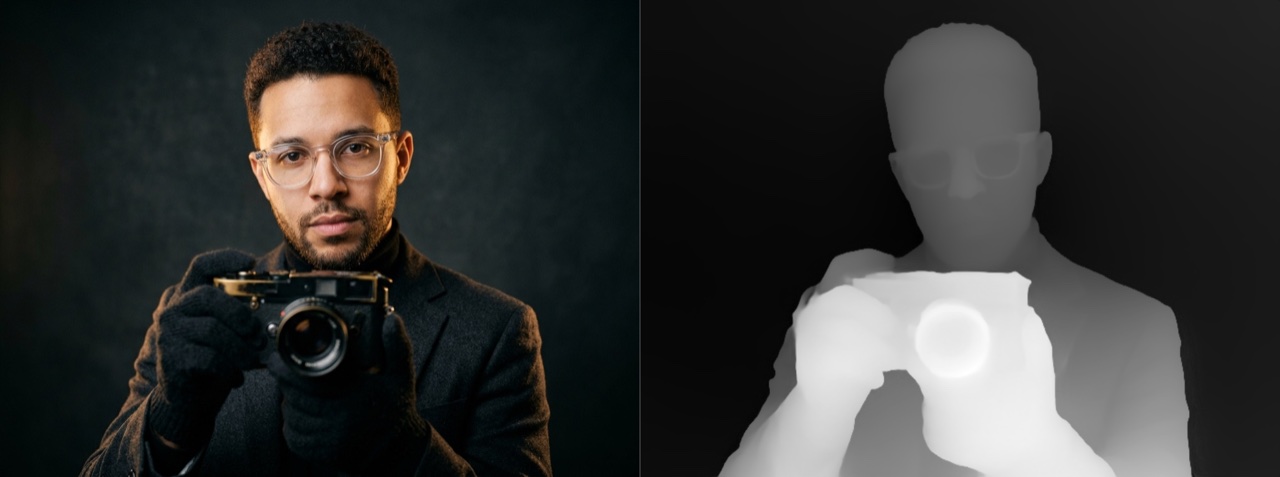
 OriginalPortraits · High Detail V2
Portrait Hair, Glasses & Clean Foreground Edges
Sharp boundaries around fine hair, hands, and eyeglass lenses with zero manual masking — ready for realistic DSLR-style Lens Blur in Photoshop or Lightroom.
 DepthAnything.app
Turn any JPG, PNG, WebP, or AVIF photo into a high-resolution grayscale or true 16-bit PNG depth map (up to 4K) right in your browser using Depth Anything V2. Under 1 second. Zero uploads. Batch ZIP. No sign-up required.
Drop one or multiple photos to create depth maps
Runs Depth Anything V2 privately in your browser — supports JPG, PNG, WebP & AVIF. Export 8-bit or true 16-bit PNG at original resolution (up to 4K), or select multiple files for a ZIP archive.
Or try an instant built-in sample
Depth Anything V2 · < 1s Local
Runs Depth Anything V2 Small & Base in your browser via WebGPU/WASM. Zero server queues.
Zero Uploads · 100% Private
Every photo and video stays on your device. Never transmitted to or stored on any server.
True 16-bit PNG · Up to 4K
Genuine 65,536-level uint16 grayscale PNGs (IHDR bit depth 16) at original resolution up to 4K.
Batch ZIP · Video · 3D Parallax
Drop multiple images for ZIP download, export video PNG sequences, or animate 3D parallax videos.
Exact browser-local model weights, export bit depths, resolutions, and supported workflows — verified directly in the app.
Hair, glasses, foliage, fine carvings, and deep outdoor landscapes — clean edges with zero manual masking. Every split preview below was generated directly in the browser with Depth Anything V2.
OriginalPortraits · High Detail V2Sharp boundaries around fine hair, hands, and eyeglass lenses with zero manual masking — ready for realistic DSLR-style Lens Blur in Photoshop or Lightroom.
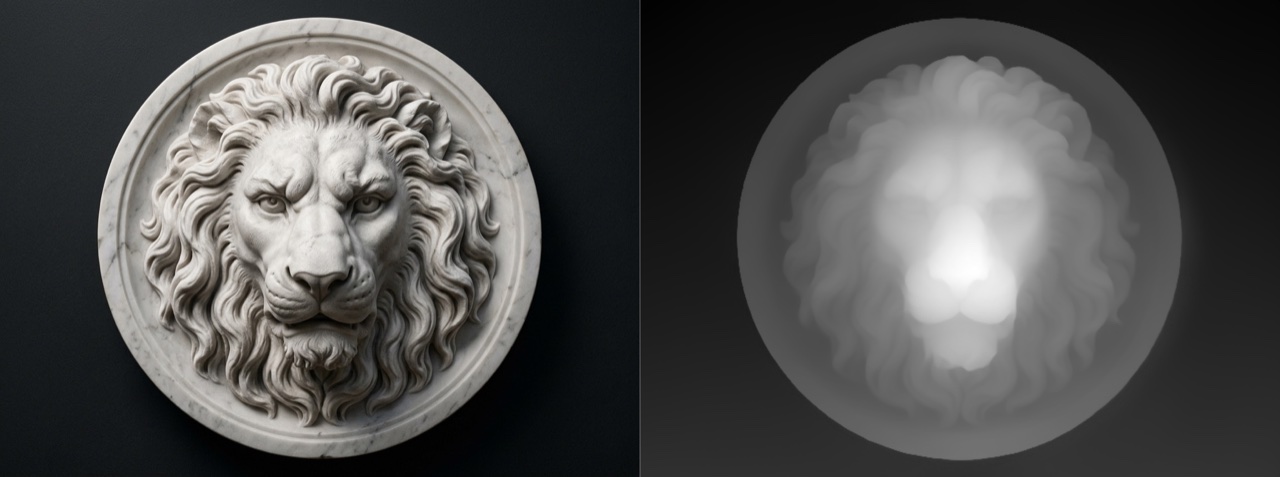 OriginalRelief · True 16-bit PNG
Captures subtle curved depth on medallions, portraits, and emblems without 8-bit stair-stepping — ideal for Blender displacement, LightBurn, and CNC carving.
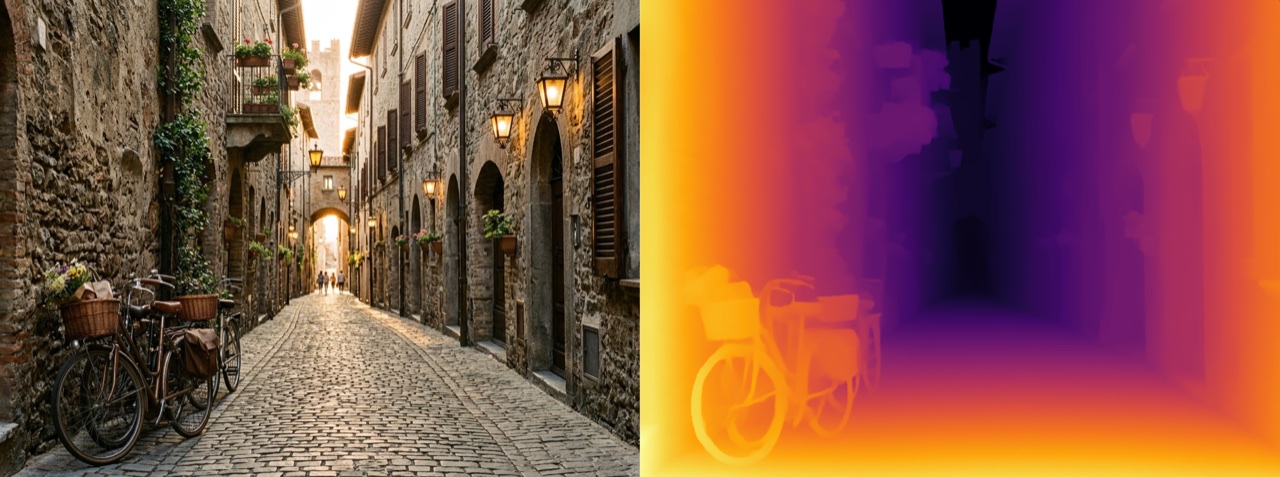 OriginalLandscapes & Streets · Inferno
Reads foreground objects, walls, trees, and receding horizons in accurate depth order for outdoor landscapes, 3D parallax videos, and VFX compositing.
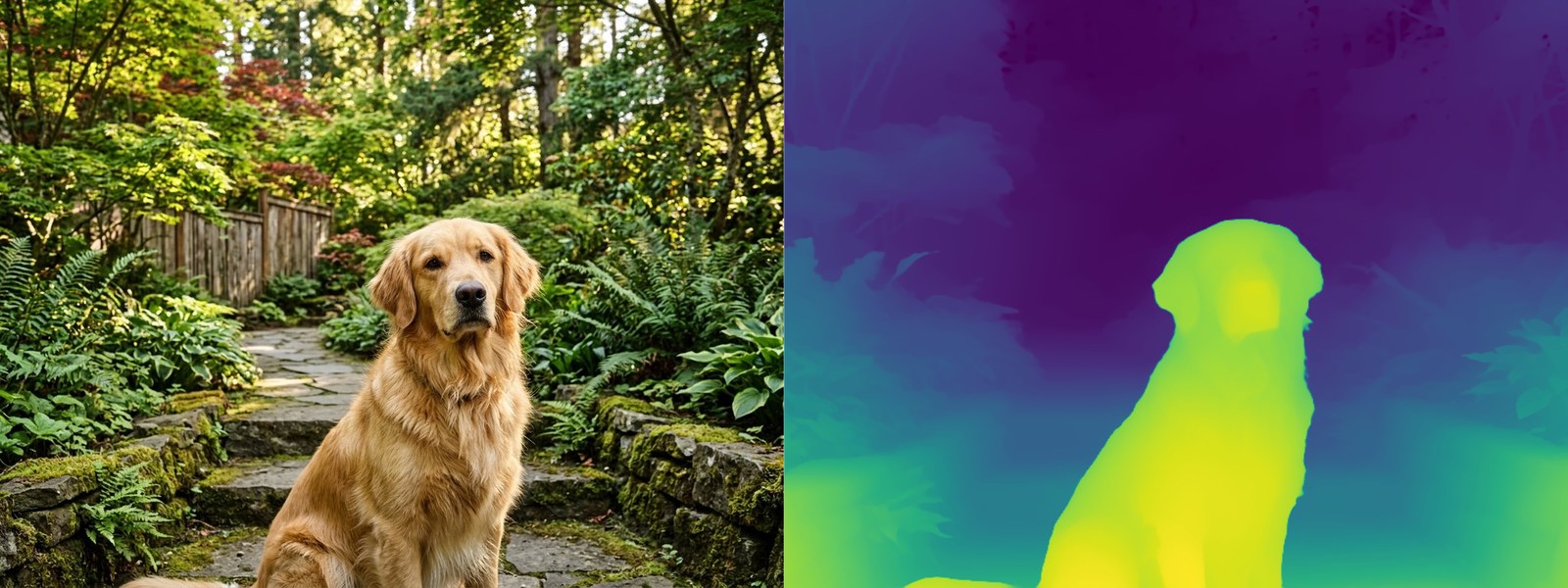 OriginalPets & Foliage · Viridis
Separates fine golden fur, foreground stone steps, flanking ferns, and woodland backgrounds cleanly in a single pass.
Drop one JPG, PNG, WebP, or AVIF for an instant grayscale depth PNG—or drop dozens of images at once and click Download All ZIP in 8-bit or true 16-bit PNG.
Switch to High Detail (Depth Anything V2 Base) for crisp hair strands, glasses, foliage, and deep outdoor horizons—exported at full original resolution up to 4K.
Clip noisy backdrops down to pure black (#000000) with Far Clip, smooth surfaces for laser or CNC reliefs, or flip white/black polarity in one click.
< 1s
Per Photo Locally
Depth Anything V2 via WebGPU — zero cloud queue
65,536
True 16-bit Levels
Genuine uint16 grayscale PNGs up to 4K resolution
0
Files Uploaded
Processed privately on desktop & mobile browsers
∞
Free & Unlimited
No daily cap, no watermarks, no forced sign-up
Need 4K true 16-bit PNGs, bulk multi-image ZIP batches, video PNG sequences, Photo-to-3D parallax videos, LightBurn laser settings, CNC heightmaps, or ControlNet depth maps? Open a pre-tuned workflow below.
Export true 65,536-level 16-bit grayscale PNGs at original resolution up to 4K for Blender, Photoshop & VFX.
Process multiple JPG, PNG, or WebP photos at once locally and download all 8-bit or 16-bit depth maps as one ZIP.
Convert MP4/WebM/MOV clips with temporal anti-flicker, live timeline preview before download, and PNG sequence ZIP export.
Turn a single photo—or a photo + custom depth map—into a 30 fps 3D motion video on desktop, iPhone Safari, or Android Chrome.
Smooth surfaces, background cutoff, and instant raised/recessed flip for fiber, MOPA & CO2 lasers.
True 65,536-level grayscale PNG heightmaps pre-smoothed for hardwood CNC carving and STL meshes.
Zero-blur, standard white-near depth maps ready for Stable Diffusion, SDXL, and Flux.1 Depth (Preprocessor: None).
No cold starts, no shared-GPU queues, true 16-bit 4K PNGs, Batch ZIP, and video PNG sequences right inside your browser.
| What Matters | DepthAnything.app | Hosted Demos & Cloud Tools |
|---|---|---|
| Speed & Wait Time | Under 1 second per photo locally via Depth Anything V2 — zero queue | 10–60s cold starts and shared GPU queues |
| Daily Limits & Credits | Unlimited free runs, zero watermarks, no daily cap | Daily free caps, credit packs, or paywalls |
| Photo & Video Privacy | Zero uploads — files never leave your browser | Photos and videos uploaded to third-party servers |
| True 16-bit PNG & 4K Resolution | Genuine 65,536-level uint16 PNGs at original resolution up to 4K | 8-bit only, downscaled previews, or ~400-level quantized PNGs |
| Batch ZIP & Video PNG Sequence | Multi-image Batch ZIP + Video PNG Sequence ZIP (8-bit & 16-bit) | Single-image only or compressed MP4 without frame sequences |
| Live Preview & Controls | Instant Far/Near Clip, Contrast, Gamma, Smoothing, Video Scrubber & Custom-Depth 3D Parallax | Fixed raw output with no live adjustments or pre-download video preview |
Honest model comparisons (Depth Anything V2 vs V3 vs Video Depth Anything), portrait & landscape workflows, and video PNG sequence tutorials.
Honest benchmark and workflow guide comparing browser-local Depth Anything V2 against official Hugging Face V3, Video Depth Anything, DepthCrafter, and Marigold.
How to get crisp portrait hair/glasses separation for Photoshop Lens Blur and clean outdoor landscape depth without mirror or water reflection artifacts.
Step-by-step guide to converting MP4 clips into smooth anti-flicker depth passes, exporting 8-bit/16-bit PNG frame sequences as ZIP, and compositing.
Understand white vs. black depth values, grayscale vs. color heatmaps, relative vs. metric depth, and when to choose true 16-bit PNG.
Complete walkthrough of choosing a photo, tuning Far Clip and smoothing, and importing into Photoshop, LightBurn, Facebook 3D Photos, or Blender.
Yes. Because Depth Anything V2 runs directly inside your own browser rather than on a crowded shared server, all depth tools work immediately without signing up, with no daily run limits, no credits, no queues, and no watermarks.
Upload JPG, JPEG, PNG, WebP, or AVIF photos—single or multiple images at once. Export Resolution defaults to Original (up to 4K / 4096px max edge) using smooth Float32 bilinear resampling, with an optional Standard (≤1280px) mode.
Yes. Unlike demo tools that wrap rounded ~400-level values inside a 16-bit container, our encoder writes a genuine 16-bit monochrome PNG (IHDR bit depth 16, color type 0) across all 65,536 grayscale levels (0–65,535) directly from Float32 predictions.
Yes. Select or drag multiple photos directly onto the dropzone (or open /batch-depth-map-generator). Every photo processes sequentially on your device, and you can click Download All ZIP in either 8-bit PNG or true 16-bit grayscale PNG.
Yes. Switch the top toggle to High Detail (Depth Anything V2 Base) for sharp portrait hair strands, glasses, and fine foliage, or deep outdoor landscapes with foreground-to-horizon separation. Mirror and water reflections can be cleaned up with 1–2 px smoothing or Far Clip.
Yes. Open /video-to-depth-map to convert MP4, WebM, or MOV clips (up to 60s) with Temporal Anti-Flicker EMA smoothing, scrub every frame interactively in the live player before downloading, and export either an .MP4/.WebM video or a ZIP archive of 8-bit/16-bit PNG frames.
Yes. Switch to the 3D Parallax tab (or visit /3d-parallax-photo) to auto-generate depth OR upload your own custom grayscale depth map, preview Orbit/Sway/Tilt/Dolly motion with mouse or touch drag on iPhone Safari and Android Chrome, and export a watermark-free 30 fps 3D video loop.
Zero files are ever uploaded—everything runs privately on your device via ONNX Runtime Web (WebGPU with automatic WebAssembly fallback). DepthAnything.app is an independent third-party browser app running open-source Depth Anything V2 models (Small and Base) and is not affiliated with or endorsed by the original research authors.