Interactive Preview Before Downloading
Scrub every frame on the built-in live player, compare Side-by-Side vs. Depth Only, and fine-tune Far Clip, Contrast, or Anti-Flicker weight in real time before exporting a single file.
 DepthAnything.app
Turn MP4, WebM, or MOV clips into temporally smoothed grayscale depth videos or a ZIP of 8-bit / true 16-bit PNG frames. Preview every frame live on an interactive timeline before downloading — zero uploads.
Drop an MP4, WebM, or MOV video to generate depth frames
Preview every frame on an interactive timeline before downloading — export as a depth video (.MP4 / .WebM) or a ZIP of 8-bit / true 16-bit PNG frames privately on your device.
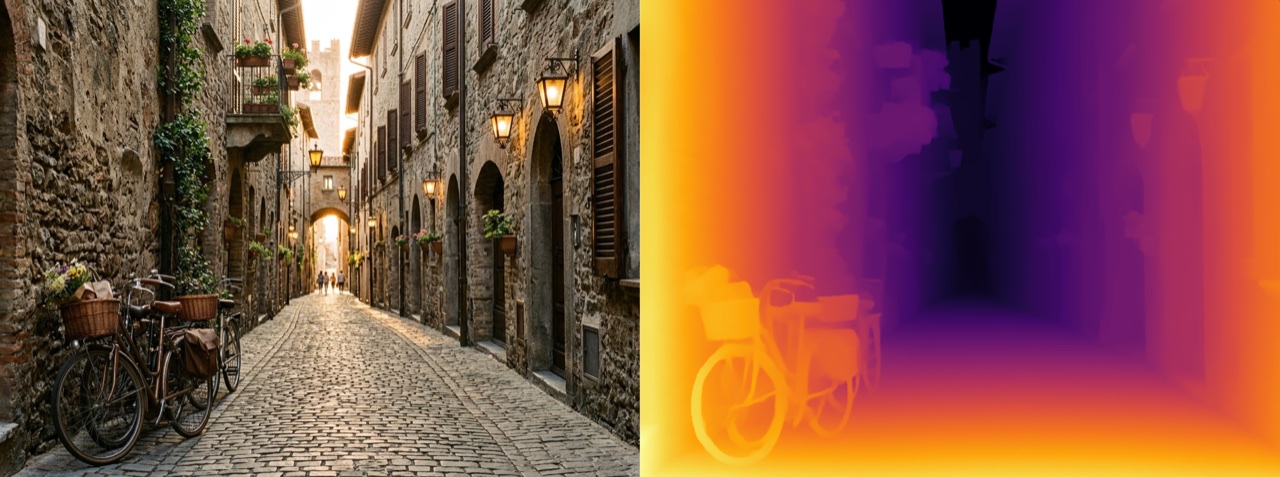 OriginalVideo Depth · PNG Seq ZIP
Compute AI depth once per clip, scrub the interactive timeline to inspect foreground-to-horizon separation and temporal consistency before downloading, then export either a ready-to-edit video or a ZIP archive of numbered 8-bit/16-bit PNG frames.
Scrub every frame on the built-in live player, compare Side-by-Side vs. Depth Only, and fine-tune Far Clip, Contrast, or Anti-Flicker weight in real time before exporting a single file.
Download a compressed depth video (.MP4 / .WebM) for quick edits, or click PNG Seq (.zip) / 16-bit Seq (.zip) to get lossless numbered PNG frames with zero video codec banding.
Temporal EMA smoothing tames single-frame brightness flicker while keeping unreleased client footage 100% private on your own machine—no GPU queue, no credits, no watermarks.
| Scenario / Setting | Recommended Value | Why It Works |
|---|---|---|
| VFX / After Effects / Nuke (Highest Quality) | 24 or 30 fps · 1080p · Grayscale · 16-bit PNG Seq (.zip) | Avoids MP4 compression banding completely and delivers true 16-bit linear Z-depth frames ready for Camera Lens Blur or fog. |
| Fast Timeline Matte (DaVinci / Premiere) | 24 or 30 fps · 720p or 1080p · Grayscale · Depth Only .MP4 | Drops straight onto an edit timeline at matching frame rate with compact file size. |
| Temporal Anti-Flicker Weight | 50–65% (locked shots / interviews) · 25–35% (fast camera pans) | Higher EMA smoothing minimizes background flicker on steady cameras; lower weight avoids trailing ghosts during whip pans. |
| Client Breakdown / Social Split Reel | Inferno or Viridis · Side-by-Side · 15–24 fps · 720p | Switch layout to Side-by-Side instantly after caching depth—zero AI recompute needed. |
Preview your clip in the live player, export either Grayscale Depth Video or PNG Sequence (.zip), and drop straight into your compositor:
Drop a local clip up to 60 seconds (or click Try 3s Sample Video) and choose your target FPS (12–60 fps) and size (480p–1080p).
Play or scrub the interactive timeline, toggle Depth Only vs. Side-by-Side, and dial Temporal Anti-Flicker weight and Contrast in real time.
Download a clean watermark-free depth video or pack every frame into a ZIP of 8-bit or true 16-bit grayscale PNGs.
Fix: Keep Temporal Anti-Flicker enabled and raise Anti-Flicker Weight to 55–65%—you can preview the smoother result immediately in the live player with zero AI recompute.
Fix: Lower Anti-Flicker Weight to 25–35% or re-extract at 24–30 fps so rapid motion updates crisply.
Fix: Browser-local Depth Anything V2 + EMA is ideal for fast private clips up to 1080p / 60s. For multi-minute 4K cinema shots with extreme camera motion, see our guide comparing Video Depth Anything and DepthCrafter.
Video to Depth Map & PNG Sequence Guide (Reducing Temporal Flicker)
Complete walkthrough of FPS selection, temporal consistency smoothing, 16-bit PNG sequences, and compositing workflows.
Depth Anything Online
All-purpose photo to depth map generator (8-bit & 16-bit PNG)
16-bit PNG & 4K Depth
True uint16 Grayscale PNG · Up to 4K Original Resolution
Batch Depth Maps (ZIP)
Multiple Images at Once · One-Click Download All ZIP
Photo to 3D Video
Single Photo OR Custom Depth Map → 3D Motion Video · Desktop & Mobile
Laser Engraving Depth Map
LightBurn 3D Sliced · Fiber, MOPA & CO2 Lasers
CNC 16-bit Heightmap
True 16-bit Grayscale PNG · 65,536 Z-Axis Levels
ControlNet Depth Map
Stable Diffusion · SDXL · Flux Depth · ComfyUI
Yes. After computing depth frames, click PNG Seq (.zip) for numbered 8-bit PNG frames or 16-bit Seq (.zip) for a ZIP of true 16-bit monochrome grayscale PNG frames—all packed locally in your browser with zero re-inference.
Yes. Once frame extraction finishes, our interactive Video Depth Player plays your entire depth pass immediately with Play/Pause, a frame-by-frame timeline scrubber, and instant Depth Only / Side-by-Side switching before you download anything.
Single-frame depth models normally rescale min/max brightness independently on every frame. Our Temporal Anti-Flicker applies exponential moving average (EMA) filtering across consecutive frames and locks global depth range—dramatically reducing flicker on interviews, handheld b-roll, and static shots. Note: unlike server-side Video Depth Anything, this runs 100% locally in your browser with zero GPU queues.
On modern Chrome, Edge, and Safari, video export saves native H.264 `.mp4` directly (falling back to `.webm` on browsers without MP4 MediaRecorder). You can choose 12, 15, 24, 25, 30, or 60 fps at 480p, 720p, or 1080p for clips up to 60 seconds. For 4K resolution, our image tools support up to 4K (4096px) locally; browser video is capped at 1080p for memory stability.
Match the Frame Rate dropdown to your source clip (e.g., 24, 25, 30, or 60 fps) so every frame along your timeline receives its own depth map, then download the complete ZIP of numbered PNG frames.
Yes. Every frame is processed locally on your device using open-source Depth Anything V2 models via ONNX Runtime Web (WebGPU with WASM fallback)—zero files uploaded, zero watermarks, and no account required.