Exact ControlNet Polarity & Razor Edges
Outputs standard white-near grayscale with 0 px blur so hands, architectural lines, and product silhouettes stay structurally locked.
 DepthAnything.app
Create sharp white-near ControlNet depth maps for ComfyUI, Flux.1 Depth, SDXL & Forge. Zero blur. Preprocessor: None ready. Zero uploads.
Drop one or multiple photos to create depth maps
Runs Depth Anything V2 privately in your browser — supports JPG, PNG, WebP & AVIF. Export 8-bit or true 16-bit PNG at original resolution (up to 4K), or select multiple files for a ZIP archive.
Or try an instant built-in sample
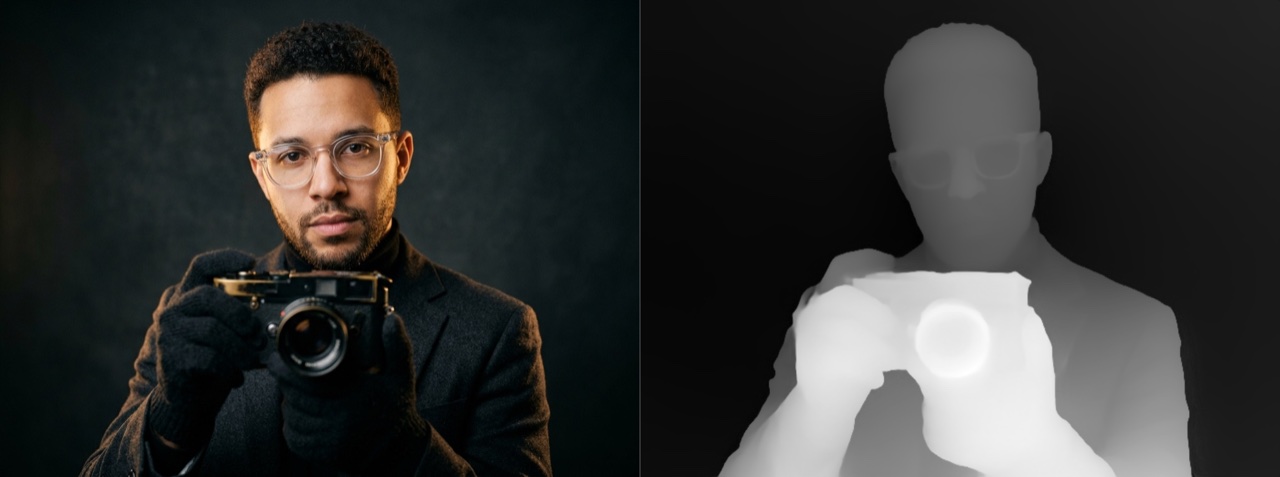 OriginalControlNet · White = Near
Clean separation between foreground camera, hands, glasses, and dark studio backdrop lets Flux.1 Depth and SDXL ControlNet preserve exact framing while completely transforming materials and lighting.
Outputs standard white-near grayscale with 0 px blur so hands, architectural lines, and product silhouettes stay structurally locked.
Generate conditioning depth maps in a browser tab without installing Python preprocessors or loading extra preprocessor models into your GPU.
Flatten far backgrounds to solid black when you want to preserve foreground pose/layout while completely changing the setting.
| Scenario / Setting | Recommended Value | Why It Works |
|---|---|---|
| Full-Scene Restyle (Architecture / Interiors) | Grayscale · Smoothing 0 px · Far Clip 0% · Weight 0.7–0.9 | Keeps walls, furniture, windows, and perspective vanishing points locked while restyling lighting, materials, and decor. |
| Character Pose & New Background | Far Clip 15–30% · Smoothing 0–1 px · Weight 0.6–0.75 | Drops the original backdrop to pure black so your prompt freely builds a new environment behind the preserved foreground pose. |
| Product Photography Swap | High Detail (V2 Base) · Contrast 1.1× · End Control at 0.8 | Sharp product contours stay true to real bottle/device geometry while letting the final 20% of sampling refine fine reflections. |
| Preprocessor Setting in ComfyUI / Forge | Set Preprocessor to None (Already Pre-Processed) | Running a second depth preprocessor on an existing depth map degrades contrast and destroys edge alignment. |
Download the crisp Grayscale PNG (8-bit), then plug it straight into your generation graph:
Upload any composition, portrait, interior photo, or Blender blockout privately inside your browser.
Check foreground alignment with the slider; leave smoothing at 0 px or raise Far Clip to isolate only your subject.
Drop the PNG straight into ComfyUI, Flux.1 Depth, Forge, or A1111 with zero extra setup.
Fix: Verify Preprocessor is set to None in ComfyUI/Forge and confirm Invert Depth Direction is OFF (White = Near).
Fix: Slide Far Clip up to 15–30% in Depth Controls so the old background flattens to uniform black before exporting.
Fix: Switch the top quality selector from Fast (V2 Small) to High Detail (V2 Base) and verify Surface Smoothing stays at 0 px.
How to Make a Depth Map from a Photo (Free Step-by-Step Guide)
Full walkthrough of Far Clip, Contrast, and exporting clean depth maps for creative tools.
Depth Anything Online
All-purpose photo to depth map generator (8-bit & 16-bit PNG)
16-bit PNG & 4K Depth
True uint16 Grayscale PNG · Up to 4K Original Resolution
Batch Depth Maps (ZIP)
Multiple Images at Once · One-Click Download All ZIP
Video Depth & PNG Seq
MP4 to Depth Video · PNG Sequence ZIP · Live Preview Before Download
Photo to 3D Video
Single Photo OR Custom Depth Map → 3D Motion Video · Desktop & Mobile
Laser Engraving Depth Map
LightBurn 3D Sliced · Fiber, MOPA & CO2 Lasers
CNC 16-bit Heightmap
True 16-bit Grayscale PNG · 65,536 Z-Axis Levels
Yes. Because the exported grayscale PNG is already a normalized white-near depth map, always set Preprocessor to None in Forge/A1111 or bypass any preprocessor node in ComfyUI.
Yes. Flux.1 Depth, SDXL ControlNet Depth, ControlNet Union Pro, and SD 1.5 Depth all share the same white-near / black-far grayscale standard.
Start at 0.70–0.85 strength and end conditioning around 80–90% of steps. Dropping control slightly before the final steps lets the diffusion model paint sharper skin, reflections, and micro-textures.
Yes. Slide Far Clip up (15–30%) until the old backdrop turns pure black, leaving only your foreground subject shaded in bright tones.
Never. Depth generation executes strictly on your local device inside your browser—zero images ever touch a server.
The tool runs open-source Depth Anything V2 models locally via ONNX Runtime Web (Small for Fast mode, Base for High Detail mode), matching the popular ComfyUI DepthAnythingV2Preprocessor output.