Auto Depth Map + 3D Video Export in One Place
Drop a single JPG, PNG, or WebP photo—Depth Anything V2 estimates depth locally in seconds so you can preview 3D motion, export a 30 fps looping video, AND save the 8-bit/16-bit depth map.
 DepthAnything.app
Turn any single 2D photo into a looping 3D motion video automatically—or upload your own custom depth map—right in your desktop or phone browser (iPhone Safari & Android Chrome). Zero uploads, zero watermarks.
Drop one or multiple photos to create depth maps
Runs Depth Anything V2 privately in your browser — supports JPG, PNG, WebP & AVIF. Export 8-bit or true 16-bit PNG at original resolution (up to 4K), or select multiple files for a ZIP archive.
Or try an instant built-in sample
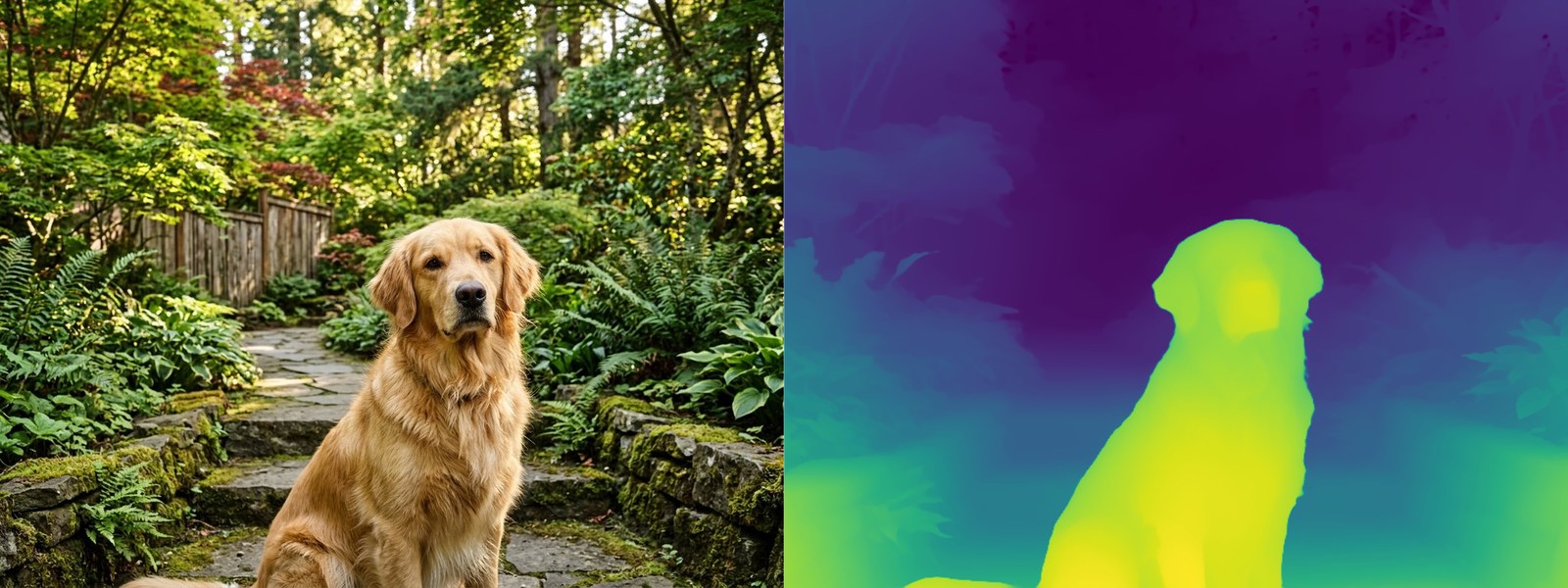 Original3D Parallax · Auto or Custom Depth
Whether you drop a single phone snapshot for automatic Depth Anything V2 estimation or bring your own hand-painted Photoshop/Blender depth map, our WebGL parallax engine separates foreground, mid-ground, and background into a clean 30 fps 3D loop.
Drop a single JPG, PNG, or WebP photo—Depth Anything V2 estimates depth locally in seconds so you can preview 3D motion, export a 30 fps looping video, AND save the 8-bit/16-bit depth map.
Have a refined depth map from Photoshop, Blender, LiDAR, or another generator? Click Upload Custom Depth Map inside the 3D Parallax view to pair your exact photo + depth map immediately.
No app store download or login wall. Open directly in iPhone Safari or Android Chrome, drag with your finger to tilt the 3D photo, and tap Export 3D Video for Reels, TikTok, or Shorts.
| Scenario / Setting | Recommended Value | Why It Works |
|---|---|---|
| Subtle Editorial / Portfolio Loop | Orbit or Sway · Depth 2.0–3.0% · Smoothing 2–3 px | Feels like a cinema camera gliding on a motorized slider with minimal background edge distortion. |
| Dramatic Travel & Landscape Reveal | Dolly Zoom · Depth 3.5–4.5% · Focus 0.5 · Smoothing 3 px | Creates a punchy push-in effect separating foreground trees, archways, and distant mountains. |
| Portrait Hero Anchor (People & Pets) | Focus Plane 0.65–0.80 · Horizontal Sway · Depth 2.5% | Locks the subject’s face steady in frame while the background glides smoothly behind them. |
| Photo + Custom Depth Map Import | Upload Photo → Click Upload Custom Depth Map → Smoothing 1–2 px | Lets you paint out glass/mirror artifacts in Photoshop or use a Blender Z-pass for flawless 3D parallax. |
Tap Export 3D Video directly in the viewport toolbar, or download the depth map for native 3D platforms:
Drop any JPG, PNG, or WebP photo on desktop or phone—auto-generate depth in seconds, or load your own custom depth map.
Move your cursor or drag on mobile to test live 3D parallax, set the stationary Focus Plane, and smooth foreground edges.
Click Export 3D Video to save a seamless 4-second 30 fps 3D clip—and optionally download the 8-bit or 16-bit depth PNG too.
Fix: Raise Surface Smoothing to 3–4 px in Depth Controls and keep Depth Strength moderate (2.0–3.2%) so edges glide cleanly.
Fix: Slide Focus upward (0.65–0.85) to anchor the foreground subject as the stationary pivot plane.
Fix: Toggle Invert Depth Direction in the right panel to flip Black = Near to standard White = Near polarity instantly.
Portrait & Landscape Depth Maps: Getting Clean Foreground Separation
Learn which portrait and landscape shots create the strongest 3D parallax pop and how to avoid reflection artifacts.
Depth Anything Online
All-purpose photo to depth map generator (8-bit & 16-bit PNG)
16-bit PNG & 4K Depth
True uint16 Grayscale PNG · Up to 4K Original Resolution
Batch Depth Maps (ZIP)
Multiple Images at Once · One-Click Download All ZIP
Video Depth & PNG Seq
MP4 to Depth Video · PNG Sequence ZIP · Live Preview Before Download
Laser Engraving Depth Map
LightBurn 3D Sliced · Fiber, MOPA & CO2 Lasers
CNC 16-bit Heightmap
True 16-bit Grayscale PNG · 65,536 Z-Axis Levels
ControlNet Depth Map
Stable Diffusion · SDXL · Flux Depth · ComfyUI
Yes. Upload your photo first, then click Upload Custom Depth Map beneath the 3D toolbar to pair any existing grayscale depth PNG/JPG (from Photoshop, Blender, LiDAR, or another AI tool) and export a 3D video loop immediately.
Yes. Uploading a single photo automatically generates a Depth Anything V2 depth map locally—you can export the 30 fps looping 3D video AND download the matching 8-bit or true 16-bit grayscale depth PNG from the same screen.
Yes. It runs directly in mobile browsers including iPhone Safari (iOS 15+) and Android Chrome with touch-drag 3D tilt and client-side video export (MP4 on Safari/modern Chrome, WebM fallback)—no app download or sign-up needed.
On modern Chrome, Edge, iOS/macOS Safari, and Android Chrome it exports an H.264 `.mp4` 30 fps seamless 4-second loop (with automatic `.webm` fallback on browsers that only support WebM recording).
No. All 3D video exports are 100% watermark-free, unlimited, free, and processed privately on your device with zero uploads.
Increase Surface Smoothing to 2–4 px in Depth Controls and keep Depth Strength moderate (2.0–3.2%). Softening sharp depth cliffs lets foreground silhouettes glide smoothly over the background.