Genuine 65,536-Level uint16 Encoding
Many online generators wrap quantized 8-bit or ~400-step outputs inside a 16-bit file. We encode every pixel directly from Float32 depth into true big-endian 16-bit grayscale PNG.
 DepthAnything.app
Export true 65,536-level 16-bit grayscale PNG depth maps (IHDR bit depth 16, color type 0) at full original photo resolution up to 4K — runs privately in your browser via Depth Anything V2.
Drop one or multiple photos to create depth maps
Runs Depth Anything V2 privately in your browser — supports JPG, PNG, WebP & AVIF. Export 8-bit or true 16-bit PNG at original resolution (up to 4K), or select multiple files for a ZIP archive.
Or try an instant built-in sample
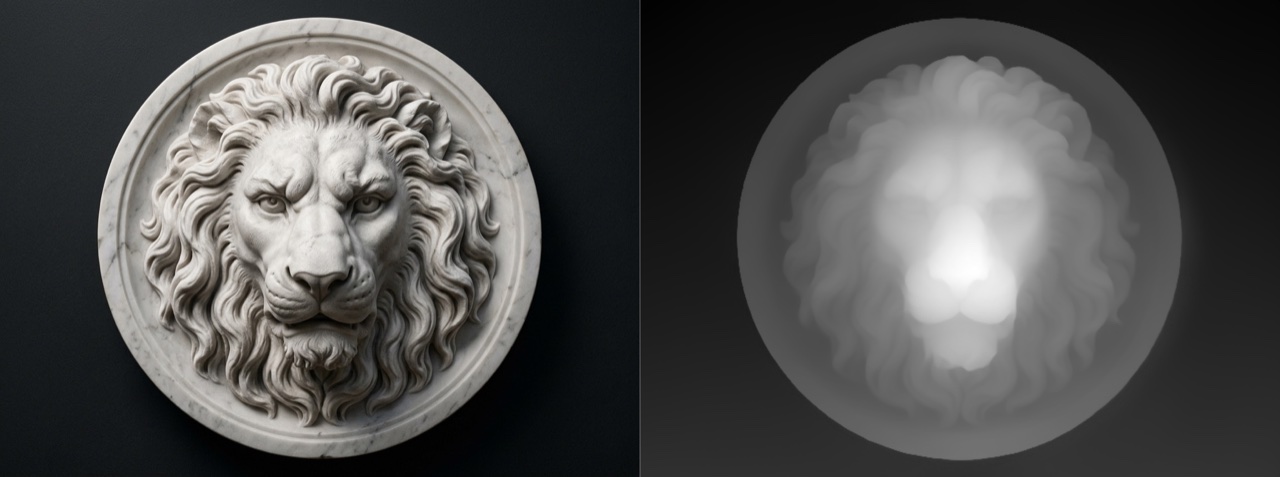 OriginalTrue 16-bit · 65,536 Levels
Standard 8-bit depth maps only store 256 gray levels—causing visible banding rings in Blender displacement, Photoshop 16-bit channels, VFX fog grading, and physical CNC reliefs. Our encoder writes all 65,536 continuous height steps directly from Float32 depth.
Many online generators wrap quantized 8-bit or ~400-step outputs inside a 16-bit file. We encode every pixel directly from Float32 depth into true big-endian 16-bit grayscale PNG.
Drop a high-resolution DSLR portrait, landscape, or texture render and export a pixel-aligned depth map up to 4096px on the longest edge using smooth Float32 bilinear resampling.
Dial Far Clip, Near Clip, Gamma, Contrast, and Smoothing live in your browser before exporting—ideal for client photography, unreleased 3D assets, and print workflows.
| Scenario / Setting | Recommended Value | Why It Works |
|---|---|---|
| Blender Displace Modifier / 3D Mesh | True 16-bit PNG · Original Resolution · Color Space: Non-Color | Preserves smooth curved slopes across subdivided meshes without contour terracing. |
| Photoshop 16-bit Lens Blur / Portrait Bokeh | Original Resolution (up to 4K) · High Detail (V2 Base) · 0–1 px Blur | Matches high-megapixel portrait dimensions pixel-for-pixel around hair strands and glasses. |
| VFX / After Effects / Nuke Depth Compositing | True 16-bit PNG · Far Clip 0% · Gamma 1.0 · White = Near | Retains full mid-tone depth dynamic range for rack-focus blur, fog, and Z-depth color grading. |
| CNC Carving & 3D Lithophanes | True 16-bit PNG · Smoothing 2–4 px · Far Clip 5–10% | Prevents microscopic photo grain from turning into steep toolpath ridges while flattening the base plane. |
Click Download True 16-bit PNG (with Export Resolution set to Original up to 4K), then import directly:
Load single or multiple images privately inside your browser—nothing is ever uploaded to a cloud server.
Inspect depth separation with the live slider and optionally tune Far Clip, Gamma, Contrast, or Smoothing.
Save a lossless 65,536-level uint16 monochrome PNG ready for Blender, Photoshop, VFX, or CNC.
Fix: Verify the Image Texture Color Space is set to Non-Color rather than sRGB, and increase mesh subdivision density.
Fix: Ensure Export Resolution in the right panel is set to Original (up to 4K) rather than Standard (≤1280px).
Fix: Confirm the top model selector is set to High Detail (V2 Base) and keep Surface Smoothing at 0 px.
Portrait & Landscape Depth Maps: Fine Hair, Skies & High-Res Workflow
Practical guide to getting sharp portrait hair edges, clean landscape horizons, and 16-bit Photoshop Lens Blur results.
Depth Anything Online
All-purpose photo to depth map generator (8-bit & 16-bit PNG)
Batch Depth Maps (ZIP)
Multiple Images at Once · One-Click Download All ZIP
Video Depth & PNG Seq
MP4 to Depth Video · PNG Sequence ZIP · Live Preview Before Download
Photo to 3D Video
Single Photo OR Custom Depth Map → 3D Motion Video · Desktop & Mobile
Laser Engraving Depth Map
LightBurn 3D Sliced · Fiber, MOPA & CO2 Lasers
CNC 16-bit Heightmap
True 16-bit Grayscale PNG · 65,536 Z-Axis Levels
ControlNet Depth Map
Stable Diffusion · SDXL · Flux Depth · ComfyUI
It is genuinely 16-bit monochrome PNG (IHDR bit depth 16, color type 0), written directly from Float32 depth predictions across all 65,536 levels (0–65,535). You can verify it with ImageMagick (`identify`), ExifTool, or Photoshop (16 Bits/Channel).
With Export Resolution set to Original (up to 4K), your depth map exports at your original photo dimensions up to 4096px on the longest edge using smooth Float32 bilinear upsampling.
Yes. Select or drag multiple photos at once, let them process locally, and click Download All ZIP (True 16-bit PNGs).
Yes. Closer foreground objects encode toward 65,535 (white) and distant backgrounds encode toward 0 (black), with a one-click Invert Depth Direction switch if your 3D software expects reversed polarity.
Never. Both Depth Anything V2 inference and 16-bit PNG encoding run 100% locally in your browser with zero file uploads.
This preset defaults to open-source Depth Anything V2 Base (High Detail) running locally via ONNX Runtime Web (WebGPU with automatic WebAssembly fallback).