
What Is a Depth Map? A Simple Guide to White, Black, 8-Bit & 16-Bit Depth
Learn what a depth map is, how white vs. black values work, 8-bit PNG vs. 16-bit heightmaps, and how creators use them for 3D photos, lasers & CNC.
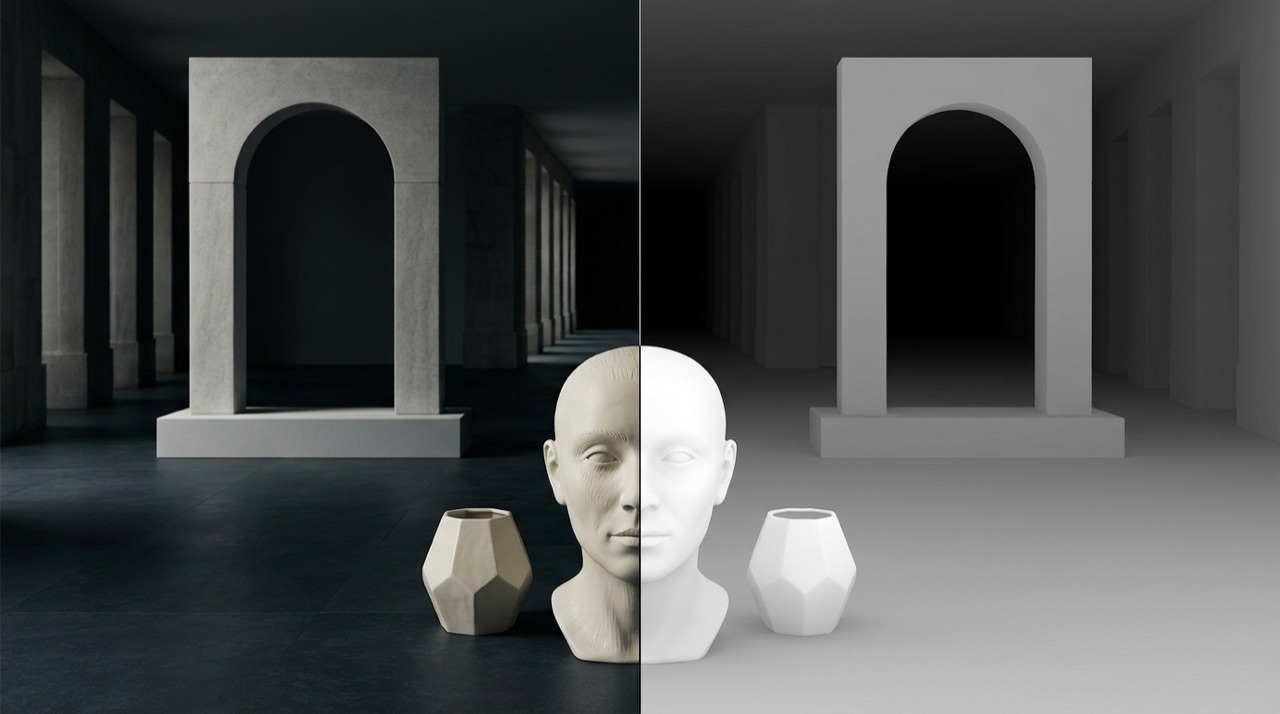
If you have ever added realistic portrait blur in Photoshop, carved a 3D relief on a laser engraver, or turned a flat photograph into a moving 3D image, you have already seen the power of a depth map.
In simple terms, a depth map is a grayscale image where every pixel's brightness represents how close or far that point is from the camera. Instead of storing color like red, green, or blue, a depth map stores distance.
How to Read a Depth Map: White vs. Black
When you look at a standard grayscale depth map, it looks like a glowing black-and-white silhouette of your photo:
- White and bright gray pixels represent objects closest to the camera (the foreground).
- Mid-gray pixels represent objects in the middle distance.
- Black and dark gray pixels represent the farthest background areas.
This "white = near, black = far" convention is the standard used by Photoshop Lens Blur, Facebook 3D Photos, Blender, LightBurn 3D Sliced mode, and most AI art tools.
Tip: Some specialized 3D engines or recessed stamp workflows expect the opposite polarity (black = near, white = far). In our free AI depth map generator, you can flip polarity with a single click using Invert Depth Direction.
Grayscale vs. Color Depth Maps (Inferno, Viridis, Plasma)
You may also see depth maps displayed in vibrant purple, orange, and yellow shades—often called color heatmaps or false-color depth maps.
| Style | Best Used For | Why |
|---|---|---|
| Grayscale | Photoshop, LightBurn, CNC, Blender, ControlNet | Software reads pure luminance (0–255 or 0–65,535) directly as height or distance. |
| Color Heatmap (Inferno / Viridis / Turbo) | Visual inspection, reels, breakdowns & presentations | Human eyes distinguish color changes much more easily than subtle gray tones. |
Always export Grayscale when importing into editing, carving, or 3D software, and use Color when showing depth visually to clients or audiences.
8-Bit PNG vs. 16-Bit Heightmap: What Is the Difference?
Not all grayscale depth maps hold the same amount of precision:
- 8-bit Grayscale PNG (256 levels): Stores values from
0(black) to255(white). This is lightweight and ideal for photo editing, Photoshop Lens Blur, Facebook 3D Photos, and ControlNet. - 16-bit Grayscale PNG (65,536 levels): Stores values from
0to65,535. When you stretch a depth map into physical height—such as wood carving on a CNC router, deep brass coin engraving on a fiber laser, or displacing a 3D mesh in Blender—8-bit files can leave visible stair-step rings on curved slopes. A true 16-bit heightmap keeps slopes completely smooth.
If you carve physical reliefs, try our dedicated 16-bit CNC Relief Heightmap Generator to export true 16-bit grayscale PNG files straight from your browser.
Relative Depth vs. Metric Depth
Most single-photo depth map tools produce relative depth:
- Relative depth tells software which objects are closer or farther compared to each other inside that image. This is all you need for bokeh blur, 3D parallax, laser reliefs, CNC heightmaps, and ControlNet.
- Metric depth measures exact physical distances in meters or millimeters, which usually requires depth hardware like LiDAR scanners or stereo camera rigs.
The Most Popular Ways Creators Use Depth Maps
Once you have a clean depth map, you can use the same grayscale file across dozens of creative workflows:
- 3D Laser Engraving: Import into LightBurn 3D Sliced mode to carve layered portraits, pets, and coins into wood, slate, or brass (Laser Engraving Preset).
- CNC Relief Carving & 3D Printing: Turn photos into smooth 3D carvings or lithophanes in Vectric Aspire, VCarve, Carveco, or Blender (CNC 16-bit Relief Preset).
- 3D Parallax Photos: Animate a still photo with subtle camera movement for Reels, Shorts, and portfolios (3D Parallax Photo Generator).
- Realistic Lens Blur & Photo Retouching: Drive Photoshop's Lens Blur filter so the background softens naturally based on real distance.
- Video Depth Effects: Generate steady depth passes for footage in After Effects or DaVinci Resolve (Video to Depth Map).
- AI Art Composition Control: Keep exact character pose or room geometry while changing art styles (ControlNet Depth Map Generator).
Ready to Create Your First Depth Map?
Read our step-by-step walkthrough on how to make a depth map from a photo, or jump straight into the free online depth map generator to try it on your own picture in seconds.
Try it free right now
Generate a grayscale or 16-bit depth map from your own photo in seconds — 100% private in your browser.
Continue Reading
Depth Anything V2 vs Depth Anything 3 vs Video Depth Anything vs Marigold: Which Online Tool Should You Use?
An honest technical comparison of Depth Anything V2, Depth Anything 3, Video Depth Anything, DepthCrafter, Marigold, and Apple Depth Pro—and which online tool fits your workflow.
TutorialHow to Make a Depth Map from a Photo (Free Step-by-Step Guide)
Step-by-step guide to making a clean depth map from any photo free online, tuning contrast & smoothing, and exporting for Photoshop, LightBurn & Blender.
Photo GuidePortrait & Landscape Depth Maps: Fine Hair, Glasses, Skies, Reflections & High-Res Export Guide
How to generate accurate depth maps for portraits (fine hair, glasses, Photoshop Lens Blur) and outdoor landscapes (horizons, skies, water & mirror reflections) at full resolution up to 4K.
Video VFXHow to Convert Video to Depth Map & PNG Sequence Online (Minimizing Temporal Flicker)
Complete workflow for converting MP4, WebM, or MOV videos into grayscale depth maps, previewing every frame before downloading, exporting 8-bit or 16-bit PNG sequences as ZIP, and minimizing flicker.